English
 Vietnamese
Tải game
Hướng dẫn tải và cài đặt game
Game Download and Installation Guide
Server phiên bản 1.8.7 với 17 class mọi người vui lòng tải bản full gồm 3 file bên dưới.
Server version 1.8.7 features 17 classes. Please download the full version, which consists of the 3 files listed below.


Patch Client English for Non-Vietnamese Players (Chỉ dùng cho người nước ngoài, các bạn Việt Nam không cần tải Patch)
Sau khi tải về các bạn chuột phải vào file TGHMDragon187.part1.rar chọn Extract to TGHMDragon187\. Nếu chưa cài Winrar bạn có thể tải tại Link tải Winrar
Extract Files: After downloading, right-click on the file TGHMDragon187.part1.rar and select **Extract to TGHMDragon187**.
Note: If you do not have Winrar installed, you can download it at the provided link.
Sau khi giải nén xong vào thư mục Patcher và chạy file Patcher.exe. Bấm vào nút kiểm tra để tiến hành cập nhật lên phiên bản mới nhất.
Update Game: Once extracted, open the Patcher folder and run Patcher.exe. Click the Verify/Check button to update the game to the latest version.
Sau khi cập nhật thành công hãy bấm bắt đầu để vào game.
Launch: After the update is complete, click Start to enter the game.
Các lỗi thường gặp và cách khắc phục:
Common Errors & Troubleshooting
Lỗi thiếu thư viện Runtime: tải về cài tại https://aka.ms/vc14/vc_redist.x64.exe
Missing Runtime Library: Download and install from: 
Lỗi DirectX: vào thư mục element\directx, chạy file dxsetup.exe để cài đặt DirectX.
DirectX Error: Go to the element\directx folder and run dxsetup.exe to install DirectX.
Lỗi không thể tự động cập nhật game: Bấm vào nút Kiểm Tra ở giao diện Patcher update game.
Auto-Update Failed: Click the Verify button on the Patcher interface to manually update.
Lỗi không thể bấm nút bắt đầu để vào game: đảm bảo đường dẫn game hợp lệ, tên thư mục game không viết tiếng Việt có dấu, Chương trình không hiểu được tiếng Việt nên sẽ không update được hoặc không vào game được. Nếu đường dẫn đã hợp lệ nhưng vẫn không bấm bắt đầu được thì hãy thử mở game bằng thư mục element\x64\ElementClient_x64.exe
"Start" Button Unresponsive: Ensure the game path is valid. If the path is correct but it still won't start, try launching via: element\x64\ElementClient_x64.exe
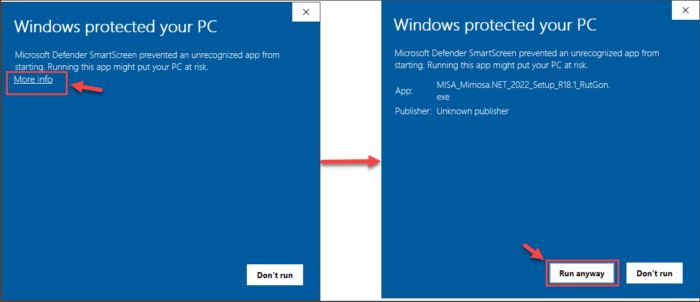
Cảnh báo Windows protected your PC. Đây là tính năng của windows chặn chạy các file đuôi .exe lạ để bảo vệ PC. Nếu xuất hiện cảnh báo này các bạn nhấp vào More info rồi bấm vào Run anyway.
Warning: "Windows protected your PC": This is a Windows security feature that blocks unrecognized .exe files. If this warning appears, click More info and then select Run anyway.